 Animated Elements
No codeBuilt without a line of code. Many of the sections use Animated Elements, and the app keeps every one of them editable in your builder.
Northfield Positioning
Long-form offer page for an independent consultant selling a $28,000 six-week engagement, built to qualify on price before it books the call.
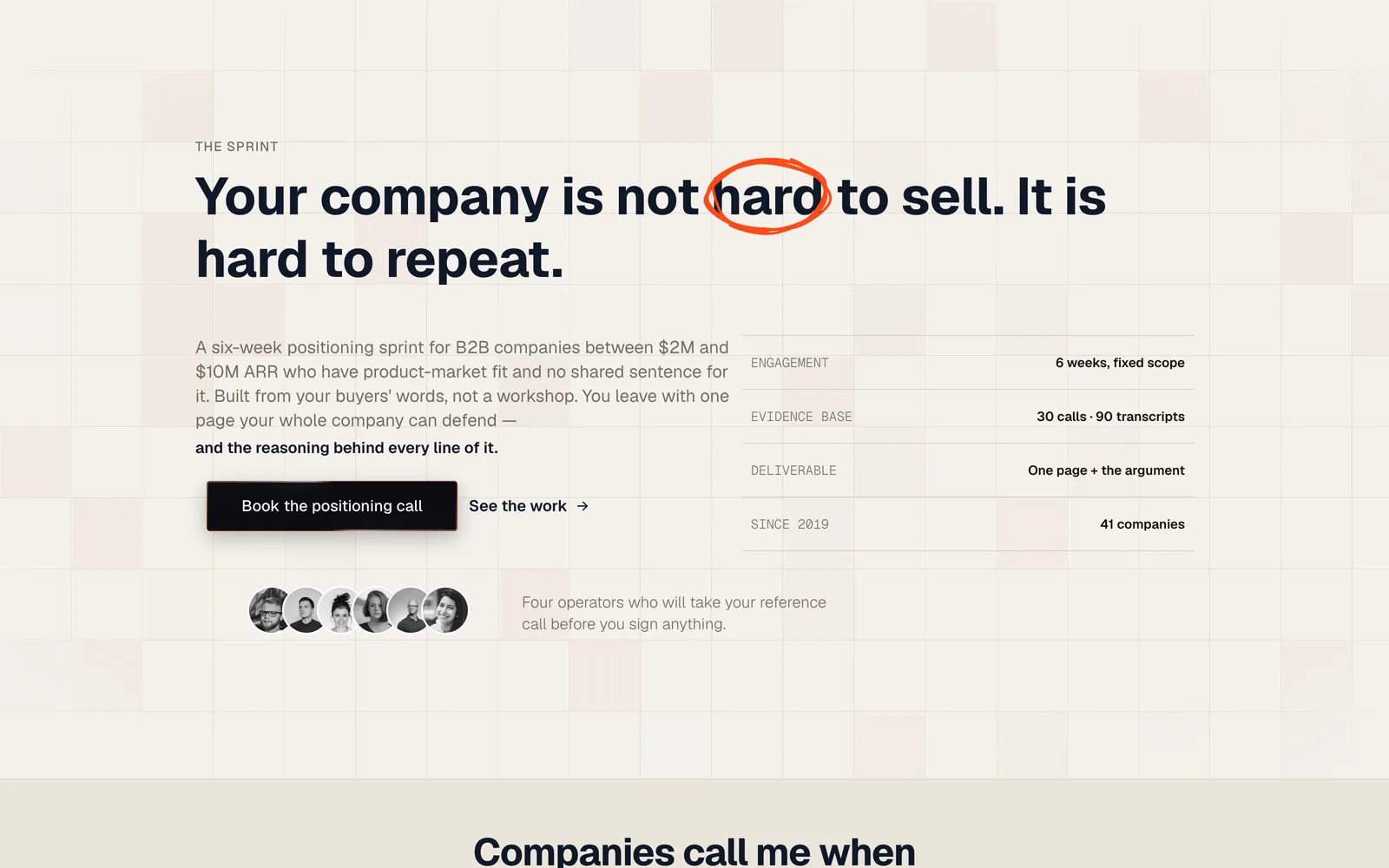
Hero and booking CTA
What it is and who it converts
Most consultant sites sell credibility and hope the contact form does the rest. This one is built for the other model: one operator, a capped number of engagements a year, and a fixed price high enough that the page has to disqualify before it converts. Every section is arranged around that job.
The hero states the problem in the buyer's own language, then hands over four hard facts: duration, evidence base, deliverable, track record. No transformation promise, no discovery-call framing. The proof row and the reference-call operators sit high on the page on purpose, because a $28,000 engagement is bought on trust well before it is bought on scope.
Price appears in full with a payment plan and a retainer tier beside it. The FAQ is written as objections rather than questions, and two of the six answers are reasons not to buy, which is what makes the other four land. A live viewer counter and a stated slot cap do the scarcity work without a countdown timer.
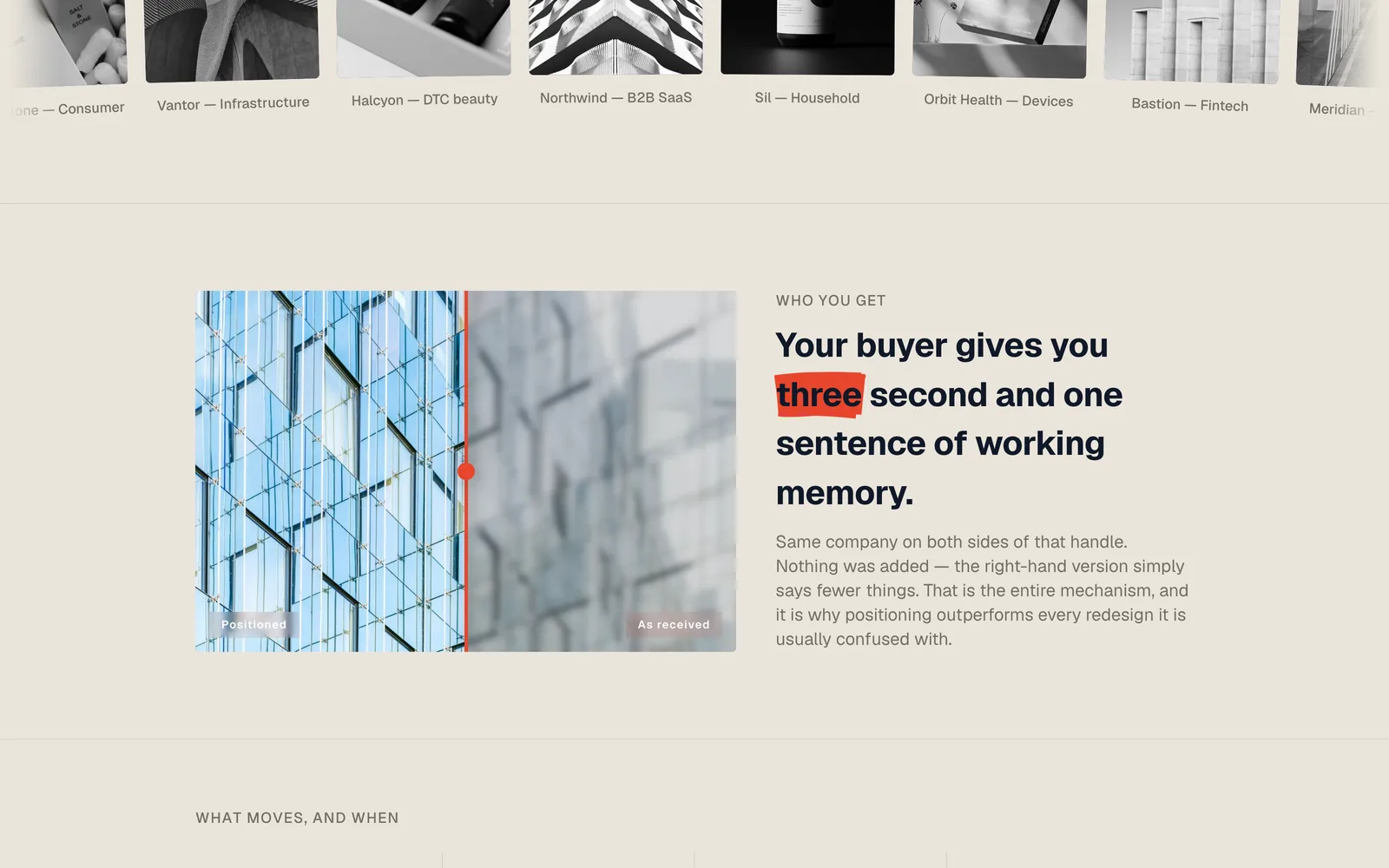
Twenty four Animated Elements run across the page: a flickering grid hero, scramble headings on every section label, counters on the results row, a before and after comparison, a depth carousel carrying the six deliverables, and an animated testimonial block. The layout alternates cream and near-black sections against a single orange accent, and both colours are one variable each in the builder, so rebranding it is minutes, not an afternoon.
1 steps, 16 sections, all editable
The steps
- 01
Offer page
Long-form positioning sales page: problem, proof, mechanism, deliverables, operator bio, testimonials, two-tier pricing and an objection FAQ, with the booking CTA repeated at every decision point.
Sections, in scroll order
- 01Hero with flickering grid background
- 02Engagement facts bar
- 03Reference-call operators
- 04Rotating problem statements
- 05Selected work logo marquee
- 06As received versus positioned
- 07Measured outcomes
- 08One page manifesto and deliverables carousel
- 09Three deliverables in detail
- 10Who you get
- 11Client voices
- 12The rest of them
- 13Pricing: sprint and retainer
- 14Objection FAQ
- 15Closing CTA
- 16Credential marquee footer
Everything that is built in
- Single-page offer site with 16 sections
- Four-fact credibility bar under the hero
- Reference-call operator row with hover profiles
- Rotating problem statements in the buyer's words
- Client logo marquee with eight named engagements
- As-received versus positioned comparison slider
- Results row with four animated counters and an honesty note
- Six deliverables on a depth carousel
- Three deliverables in detail, each with its own CTA
- Operator bio that sells the capacity limit
- Animated testimonial block with three full quotes
- Six-card testimonial marquee
- Two-tier pricing: fixed sprint and monthly retainer
- Live viewer counter on the pricing block
- Six-question objection FAQ with badges
- Credential marquee in the footer
- Cream and near-black sections against a single orange accent
- Mobile layout built, not inherited
Built for this, and it travels
It was written for consultants, and the structure underneath is not specific to them. Swap the copy and the images and the same page carries a different offer.
- Independent consultants and advisors selling fixed-scope engagements above $10,000
- Fractional executives who need the page to qualify before the call
- Positioning, brand and strategy practices selling a named methodology
- Anyone replacing a vague contact form with a priced, capped offer
How to import Northfield Positioning into your GoHighLevel account
- 01
Log into the location you want it in
Open GoHighLevel and switch to the sub-account that should receive the template. Whichever location is active when you open the link is the one that gets it, so check this first.
- 02
Open the share link
Paste the link into the same browser and open it. GoHighLevel shows you what is about to be imported and which location it is going to.
- 03
Confirm the import
Click import. The funnel or website appears in that location within a minute or two, with every step, section and setting intact.
- 04
Make it yours
Change the copy, images and brand colours, point the forms at your own calendar or pipeline, then set your domain and publish.
About this template
- Is this a one-page funnel or a multi-step one?
- One page. Every CTA points at the same booking step, which for a fixed-scope engagement is the right shape: the page does the qualifying, the call does the closing. Add a calendar step or an application form in the builder if you want another filter before the call.
- Can I use this for something other than positioning work?
- The structure is a priced, capped, fixed-scope consulting offer, and it transfers to any advisory engagement sold that way. Fractional CMO work, technical audits, M&A advisory and brand strategy all fit without a structural change. What needs rewriting is the evidence section, since the whole page leans on the method being specific.
- The page shows the price. Do I have to?
- No, and the pricing block is plain text in the builder. It is worth keeping. Stating the number on the page is what stops the wrong call from being booked, and this template gives up most of its qualifying power if you swap the price for a form.
- What do I need to install for the animations to work?
- All twenty four animated blocks come from the Animated Elements app. Install it in the same location and they run as shown. Without it the funnel still imports and still converts, those blocks just render static.
Licensing, plan requirements, editing after import and the rest of the general questions about GoHighLevel templates are answered on the library page.
Take Northfield Positioning and start editing
Free, delivered as a GoHighLevel share link. It lands in whichever sub-account you are logged into and it is yours to change from there.
Before you import
Northfield Positioning needs the Animated Elements app installed in your GoHighLevel account
The animated sections in this template are built on Animated Elements. Please install the app in the sub-account you are importing into. Without it, those sections land in the builder as plain blocks and the controls that drive them are not there to edit.
- Animated sections render the way they do in the live preview
- Timing, easing and scroll triggers become editable per element
- Copy, colours and images stay editable in the normal builder
- One install covers this template and every other one you take
Oakline
One-page seller funnel for a real estate team, built around a free home value request.
Funnel · Free
ReoDental
Appointment booking funnel for dental clinics, built around before and after proof.
Funnel · Free
Aether AI
Three-step free trial funnel for an AI marketing tool sold to agencies.
Funnel · Free
Ironclad Performance.
High-ticket application funnel for 1:1 fitness coaching.
Funnel · Free